
os:system:usage:cpu:proc_stat
/proc/stat 정보
개념
- Linux 상에서 CPU 사용률을 확인하려면 /proc/stat 정보를 확인해야 한다.
- 쓰여진 글은 kernel 2.6.x 기준으로 작성하였다.
계산공식
- CPU 사용률은 부팅후 지금까지 소모된 jiffies 의 크기를 나타낸다.
- /proc 정보를 확인해보자
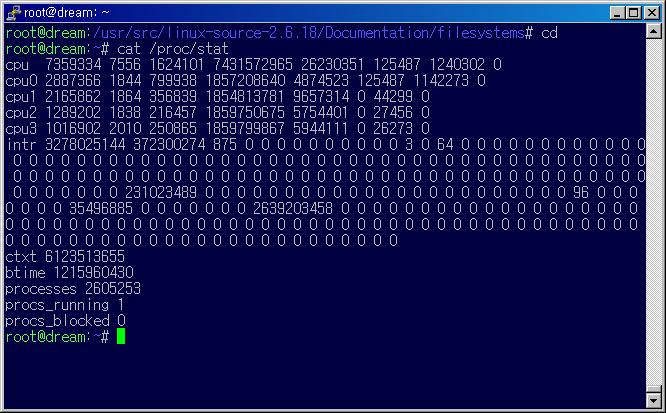

cpu
그림 중에 CPU 항목만 정리해보자
| CPU | user | nice | system | idle | iowait | irq | softirq |
|---|---|---|---|---|---|---|---|
| cpu | 7359334 | 7556 | 1624101 | 7431572965 | 26230351 | 125487 | 1240302 |
| cpu0 | 2887366 | 1844 | 799938 | 1857208640 | 4874523 | 125487 | 1142273 |
| cpu1 | 2165862 | 1864 | 356839 | 1854813781 | 9657314 | 0 | 44299 |
| cpu2 | 1289202 | 1838 | 216457 | 1859750675 | 5754401 | 0 | 27456 |
| cpu3 | 1016902 | 2010 | 250865 | 1859799867 | 5944111 | 0 | 26273 |
각 필드의 정의
| cpu | cpu number, 맨처음의 cpu는 모든 CPU 정보를 나타내는 것이다 |
|---|---|
| user | normal processes executing in user mode |
| nice | niced(=low priority) processes executing in user mode |
| system | processes executing in kernel mode |
| idle | twiddling thumbs |
| iowait | waiting for I/O to complete |
| irq | servicing interrupts |
| softirq | servicing softirqs |
CPU 사용률 계산방법
- CPU 사용률은 사용중은 ijffies 중 idle 정보를 얻어와서 백분률로 표시하면 된다.
다음 공식으로 값을 얻을 수 있다.
( (idle jiffies) / (user jiffies + nice jiffies + system jiffies + idle jiffies) ) * 100
- 이와 같은 방법을 통해 일정시간(sec) 소비된 jiffies 구해야 한다. (이전 jiffies 값도 알고 있어야 한다.)
intr
- counts of interrupts serviced since boot time, for each of the possible system interrupts.
- The first column is the total of all interrupts serviced;
each subsequent column is the total for that particular interrupt.
ctxt
- the total number of context switches across all CPUs.
btime
- the time at which the system booted, in seconds since the Unix epoch.
processes
- the number of processes and threads created, which includes (but is not limited to) those created by calls to the fork() and clone() system calls.
proces_running
- the number of processes currently running on CPUs.
process_blocked
- number of processes currently blocked, waiting for I/O to complete.
관련문서
os/system/usage/cpu/proc_stat.txt · 마지막으로 수정됨: 저자 starlits