
study:oracle:10gadminii:usingrecoverymanager
문서의 이전 판입니다!
목차
Using Recovery Manager
Objectives
- RMAN 백업명령으로 backup sets 과 image copies 를 만든다.
- RMAN을 통해 backups과 image copies를 관리한다.
Issuing Recovery Manager Commands
| interactive client | RMAN 명령어 직접 이용 analysis, reports, stored scripts 사용 |
|---|---|
| Batch mode | 자동화된 작업이용 RMAN 시작시 명령파일 실행 정보를 로그파일로 설정 |
| Pipe interface | PIPE 명령어 이용하기 RMAN 세션과 외부 어플리케이션을 이용하여 데이타 통신하기 |
RMAN Command Overview

RMAN Commands
RMAN 명령 타입
| Stand-alone | RMAN 프롬프트에서 한줄씩 실행한다 RUN 을 통한 서브 명령을 이용할 수 없다 |
|---|---|
| Job | RUN 의 괄호를 이용해야 한다 그룹 실행이 가능하다 |
| Stand-alone 또는 job | RMAN 프롬프트와 RUN 을 이용하여 실행할 수 있다 RUN의 괄호와 그룹 실행을 할 수 있다 |
Job Command: Example
RMAN> RUN {
   2> BACKUP AS BACKUPSET
   3> FORMAT '/u01/db01/backup/%d_%s_%p'
   4> DURATION 10:00 MINIMIZE LOAD
   5> (DATABASE);
   6> SQL 'alter system archive log current';
   7> }
The BACKUP Command
RMAN> BACKUP AS BACKUPSET
2> FORMAT '/BACKUP/df_%d_%s_%p.bus'
3> TABLESPACE hr_data;

Backup Constraints
백업 제한사항
- 데이타베이스는 mounted 이거나 open 상태이어야 한다.
- Online redo log 백업은 지원하지 않는다.
- clean 백업만 NOARCHIVELOG 모드에서 지원된다.
- current 데이타파일 백업만 ARCHIVELOG 모드에서 지원된다.
Parallelization of Backup Sets
멀티채널 할당과 각 채널에 포함된 데이타

Compressed Backups

RMAN> CONFIGURE DEVICE TYPE
2> DISK PARALLELISM 2
3> BACKUP TYPE TO
4> COMPRESSED BACKUPSET;
Image Copy

RMAN> BACKUP AS COPY
2> DATAFILE '/ORADATA/users_01_db01.dbf'
3> FORMAT '/BACKUP/users01.dbf' tag=DF3;

RMAN> BACKUP AS COPY
4> ARCHIVELOG LIKE 'arch_1060.arc'
5> FORMAT 'arch_1060.bak';
- Image Copy는 single data file, archived redo log, control file 들의 복사하는 것이다.
- Image Copy는 OS의 복사(copy) 명령어로 백업되어 진다.
Tags for Backups and Image Copies
tag 는 백업셋(backup set)이나 image copy에 할당된 논리적 이름이다.

BACKUP Options
- 물리적 블록 변조(corruptions) 체크
- 물리적 변조으로 인한 논리적 변조 스캔
- 중지를 위한 변조(corruptions)에 따른 임계치 설정
- 백업이 수행되기 전에 target input files 확인
- 2중 백업 셋
- 백업 셋이나 Image copy 존재시 덮어쓰기
- 저장장치(storage devices)와 media management layer의 데이타파일 사이의 데이타 전송의 제어를 하지 않는다.
Backing Up Archived Redo Logs
- Online redo log file 은 자동으로 전환된다.
- Archived log 자동복구(failover)가 수행된다.
- archived redo logs 백업의 범위를 정할 수 있다.
- 백업셋(Backup sets)은 archived redo log file만 포함된다.
RMAN> BACKUP
2> FORMAT '/disk1/backup/ar_%t_%s_%p'
3> ARCHIVELOG FROM SEQUENCE=234
4> DELETE INPUT;
Copying the Whole Database

전체 데이타베이스의 Image Copy를 만드는 방법
CONFIGURE 명령으로 기본설정
- CONFIGURE DEFAULT DEVICE TYPE TO disk;
- CONFIGURE DEVICE TYPE DISK BACKUP TYPE TO COPY;
- CONFIGURE CONTROLFILE AUTOBACKUP ON;
백업
- 모든 데이타파일과 콘트롤파일을 이전 image copies의 백업(백업셋 또는 Image Copy)를 아래의 명령으로 만들 수 있다.
RMAN> BACKUP COPY OF DATABASE;
RMAN
- 기본적으로 RMAN 실행은 백업명령을 순차적으로 실행된다.
그러나 아래처럼 parallelize하게 수행할 수도 있다.- CONFIGURE DEVICE TYPE DISK PARALLELISM n ( n은 parallelism의 수)
- 멀티채널 할당
- COPY 명령을 통한 백업을 멀티파일로 설정한다.
Making Incremental Backups
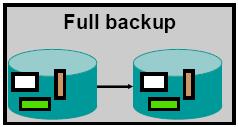
- level 0 incremental backup
모든 데이타 파일 블럭을 포함한 전체 백업과 비슷한다.
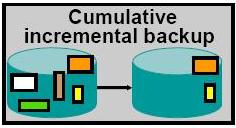
- cumulative level 1 incremental backup
level 0 백업에서 변경된 블럭만 백업된다.
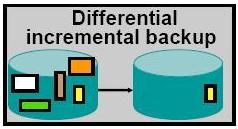
- differential level 1 incremental backup
이전 백업에서 변경된 블록만 백업된다.


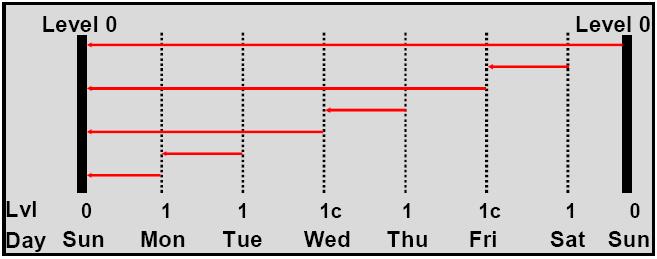
Incremental Backup: Example
- differential incremental backup 은 마지막 백업이후 변경된 블럭만 백업된다.
- cumulative incremental backup 은 level 0 백업 이후에 변경된 블럭 전체가 백업된다.

Block Change Tracking
- 변경 트랙 파일의 변경 블럭 기록
- enable 상태라면 RMAN에 의해 자동처리된다.
- 백업되는 동안 전체 데이타 스캔(full data file scans)를 피하고 최적화된 증분 백업이 이루어진다.
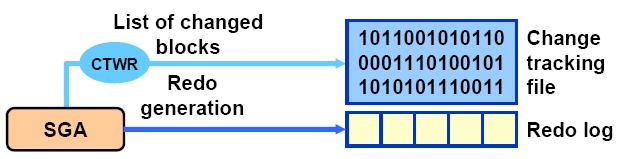

Enabling Block Change Tracking
SQL> ALTER DATABASE ENABLE
2> BLOCK CHANGE TRACKING
3> USING FILE '/mydir/rman_change_track.f'
4> REUSE;
Incrementally Updating Backups

LIST Command Operations
- 복사된 데이타파일 백업셋 정보
RMAN> LIST BACKUP OF DATABASE;
RMAN> LIST BACKUP OF DATAFILE
   2> "/db01/ORADATA/u03/users01.dbf";
- 지정한 테이블스페이스의 데이타파일 백업셋 정보
RMAN> LIST COPY OF TABLESPACE "SYSTEM";
- 특정기간의 archive log 를 포함한 백업셋 정보
RMAN> LIST COPY OF DATABASE ARCHIVELOG
   2> FROM TIME='SYSDATE-7';
The REPORT Command
- Repository에 저장되어 있는 상세정보를 보여준다.
- Reports can be produced for a variety of questions, such as:
- What is the structure of the database?
RMAN> REPORT SCHEMA;
- Which files need to be backed up?
RMAN> REPORT NEED BACKUP ...;
- Which backups can be deleted (that is, are obsolete)?
RMAN> REPORT OBSOLETE;
- Which files are not recoverable because of unrecoverable operations?
RMAN> REPORT UNRECOVERABLE ...;
The REPORT NEED BACKUP Command
- Lists all data files that require a backup
- Assumes the most recent backup is used during a restore
- Provides four options
- Incremental
- Days
- Redundancy
- Recovery window
- Uses the current retention policy configuration if no options are specified
REPORT NEED BACKUP: Examples
- Files needing three or more incremental backups for recovery
RMAN> REPORT NEED BACKUP incremental 3;
- Files have not been backed up for three days
RMAN> REPORT NEED BACKUP days 3;
- Backup needed if there are not two or more
RMAN> REPORT NEED BACKUP redundancy 2;
- Backup needed to recover 3 days past
RMAN> REPORT NEED BACKUP
   2> recovery window of 3 days;
REPORT OBSOLETE and DELETE OBSOLETE
- Find all obsolete recovery files using the current retention policy settings
RMAN> REPORT OBSOLETE REDUNANCY 2;
- List the obsolete recovery files, if no more than two backup copies are needed
RMAN> REPORT OBSOLETE;
- Delete the backup set with a backup set key of 4
RMAN> DELETE BACKUPSET 4;
- Delete the recovery files considered obsolete, because they have more than two backups
RMAN> DELETE OBSOLETE REDUNDANCY 2;
Managing Backups with EM

RMAN Dynamic Views
- V$ARCHIVED_LOG
- V$BACKUP_CORRUPTION
- V$BACKUP_DEVICE
- V$BACKUP_FILES
- V$BACKUP_PIECE
- V$BACKUP_REDOLOG
- V$BACKUP_SET
- V$BACKUP_SPFILE
- V$COPY_CORRUPTION
- V$RMAN_CONFIGURATION
Monitoring RMAN Backups
- Correlate server sessions with channels using the SET COMMAND ID command.
- Query V$PROCESS and V$SESSION to determine which sessions correspond to which RMAN channels.
- Query V$SESSION_LONGOPS to monitor the progress of backups and copies.
- Use an operating system utility to monitor the process or threads.
Summary
- RMAN 백업명령으로 백업셋과 image copies를 만들 수 있다.
- RMAN을 통해 백업과 image copies를 관리할 수 있다.
Practice Overview: Using RMAN
study/oracle/10gadminii/usingrecoverymanager.1206860684.txt.gz · 마지막으로 수정됨: 저자 starlits